Where everyone goes
Students go to imath.jagdads.com and stay there. The only
grown-up links on that page are two small ones at the very bottom, below the
player tiles — a curious child should never land in the class's progress data.
You go to imath.jagdads.com/teachers — this guide — and to
imath.jagdads.com/class for the teacher view. Bookmark both.
Your principal gets imath.jagdads.com/principal — a one-page,
printable explanation of what iMath stores about students (almost nothing) and why
district paperwork isn't triggered. Hand it over before anyone has to ask.
An account is what puts your class on every Chromebook at once and gives you a join link to hand out. The teacher view itself has no password yet, so it is only as private as the device it is open on — keep it off the student Chromebooks until sign-in reaches it.
Accounts and join links live
This is switched on. In four steps:
- You make an account at
/accountwith your email, then either find your school or add it — whoever adds it becomes its administrator and ticks the Terms of Service, which is the entire approval process. - Colleagues ask to join your school and you approve them, or you send an invite link.
- Each class gets a code and a link like
imath.jagdads.com/join?c=ABC234. A child who follows it rolls a nickname, picks a colour and a face, and is playing — no typing, no school search, nothing for you to set up per child. - Without the link a child can pick their school and then your name from a list. You can switch that off per class, and switch joining off entirely once everyone is in.
Prefer no accounts at all? Skip this entirely — the game still runs on the device exactly as it always has, and a child who has never followed a join link is never asked to sign in.
Try everything right now demo
One click, no setup: the demo student skips the intro flow and has every booth unlocked so you can tour all eight games freely.
Sessions run ~15–20 minutes, 3+ days a week. Wrong answers are never punished — missed facts just come back.
What a student actually sees start to finish
Every picture below is a real screen from this build, in the order a child meets it. The whole first run — sign-in through placement — takes about five minutes, once, on day one.
Signing in
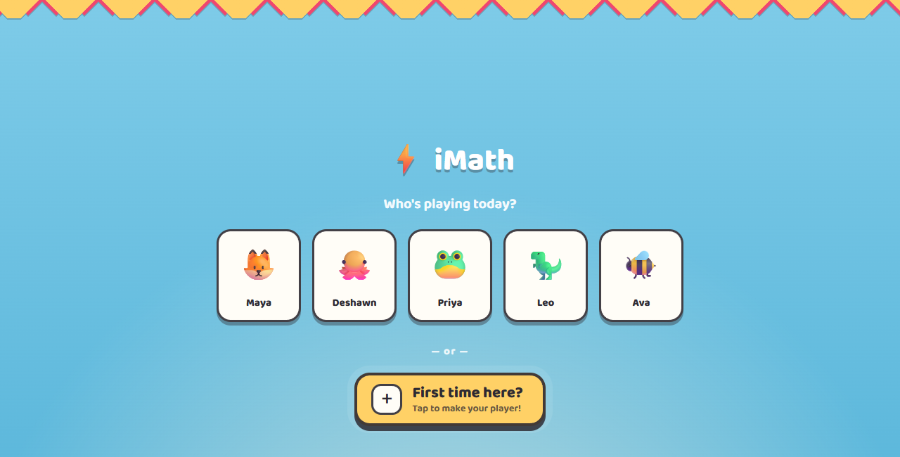
10 secondsKids tap their own face on the class grid and they are in — one tap, no PIN. A brand-new student taps First time here? and makes a player in under a minute: nickname and a face, nothing else.
Why no PIN? Every child in the pilot has their own Chromebook, so a
PIN guarded a door only one child walks through — and a forgotten one locked a child out
of their own progress with no way back. It is a single switch
(shared-ui/flags.ts) and comes back the moment devices are shared.
"This block is YOU"
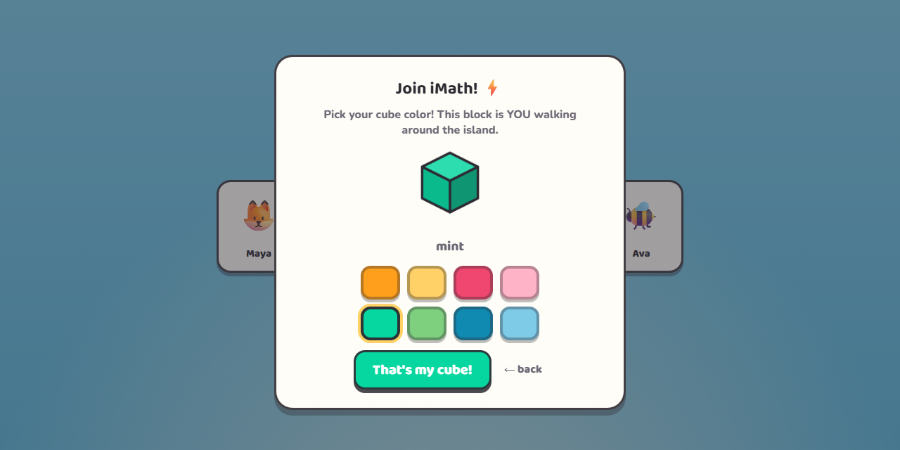
20 secondsNew players pick one of eight cube colors. That cube is how they walk around the island, and it is the first thing on the whole site that belongs to them.
Coach Axel's tour
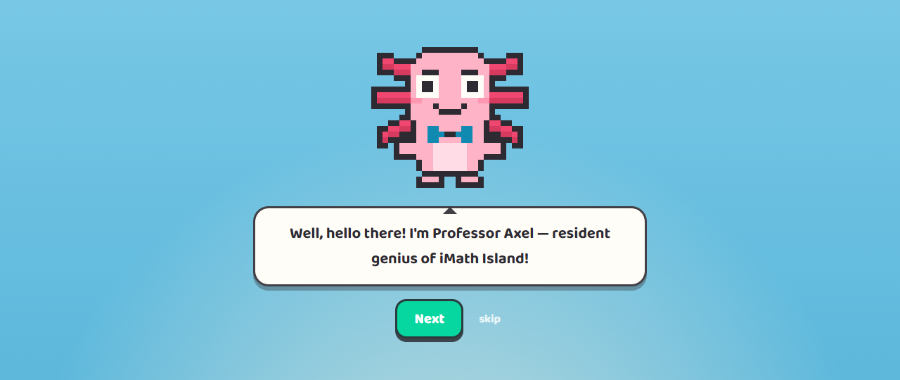
4 screens · skippableAxel, the island's resident axolotl genius, introduces himself, explains that the island is a carnival of math games with booths that open as you play, points at the Test Your Strength tower, and hands the child off to the warm-up. A skip link is on every screen for the kid who has seen it before.
Finger warm-up
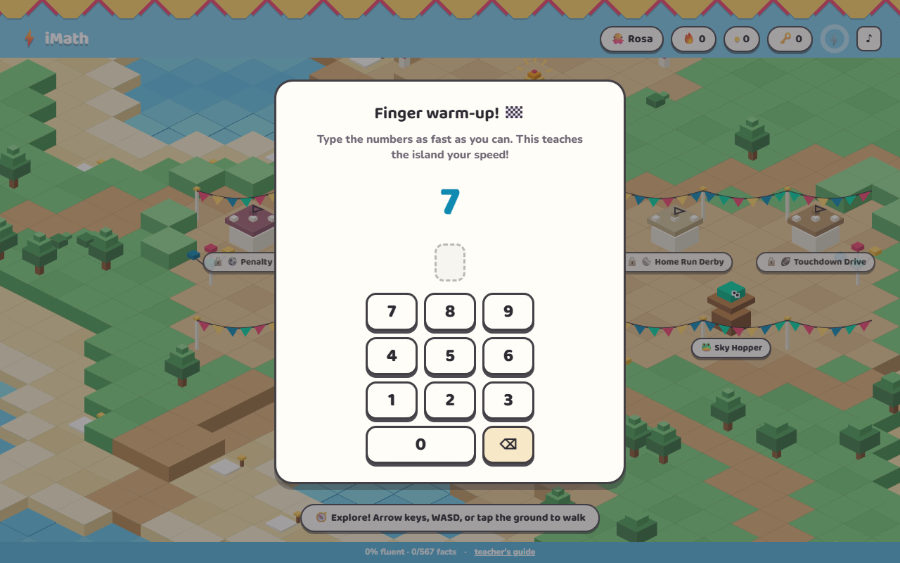
~30 secondsThe child types five numbers as fast as they can. The app measures milliseconds per digit and stores that as their personal typing baseline.
Why it matters: fluency here means speed of recall, so the engine has to know how much of a child's answer time was thumbs and how much was thinking. Every later "was that fast?" judgement adds their own typing overhead back in — a slow typist is never mistaken for a slow mathematician.
The skills assessment
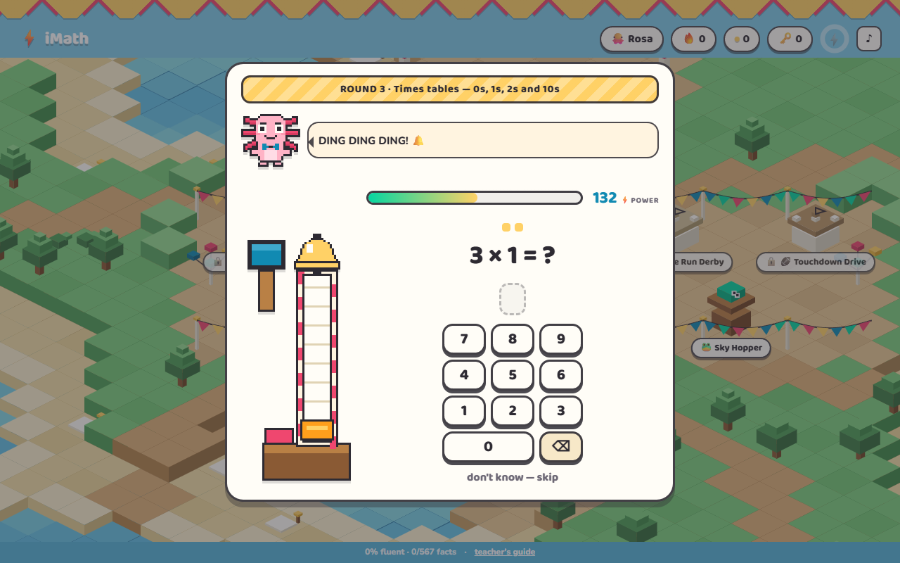
~2 minutes · onceThe placement test is a carnival high striker — "Test Your Strengths." Each swing of the mallet is one math fact; ringing the bell means the child has cleared a skill band. It searches five bands, and it does not march up them in order:
- Add & subtract — the basics
- Add & subtract — the big ones
- Times tables — 0s, 1s, 2s and 10s
- Times tables — 3s, 4s and 5s
- Times & divide — 6s to 12s
Two quick correct answers clear a band and the test jumps upward; two misses drop it back down. It is a binary search, capped at fifteen questions, so most students finish in about two minutes regardless of level.
Two design promises to tell your class: one slow-but-correct answer never counts against them — a distracted moment is not evidence. And "don't know — skip" is scored exactly like a wrong answer, no worse, so there is nothing to gain by guessing and nothing to fear in skipping.
The placement result
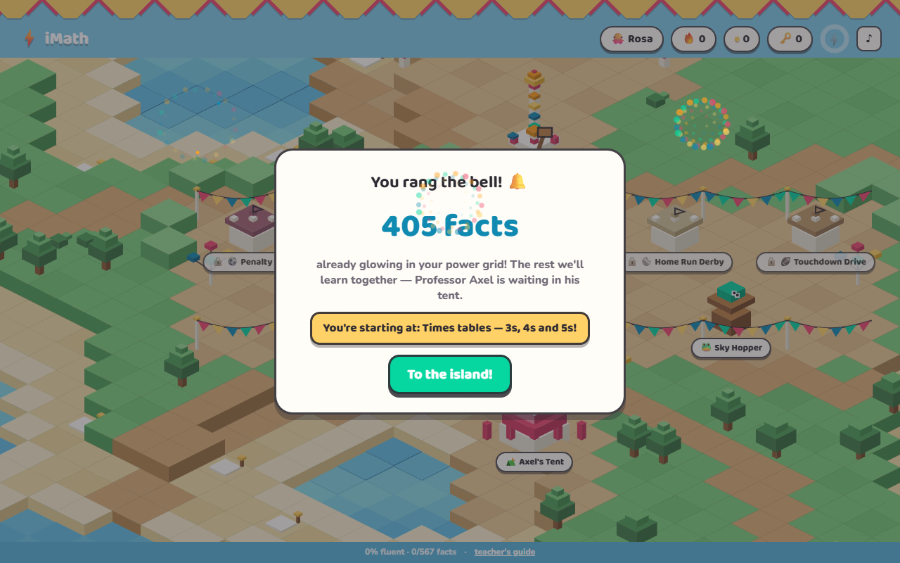
the pay-offClearing a band credits every fact underneath it. A strong student never grinds 1+1, and a student who is still shaky on their tables never opens the app on 7×8.
Credited is not mastered. Everything the assessment credits starts as practicing — it still has to be answered quickly, several times, inside the games before the engine calls it fluent. Placement sets the starting line, not the grade.
The island
home baseA carnival midway the student walks around with arrow keys, WASD, or by tapping the ground. Booths are the games; Axel's Gym is the Daily Power-Up and one-on-one coaching; the tower is always there for a re-test.
Sky Hopper and Critter Garden are open on day one. The other six booths are padlocked and cost a key — which is where the daily goal comes in.
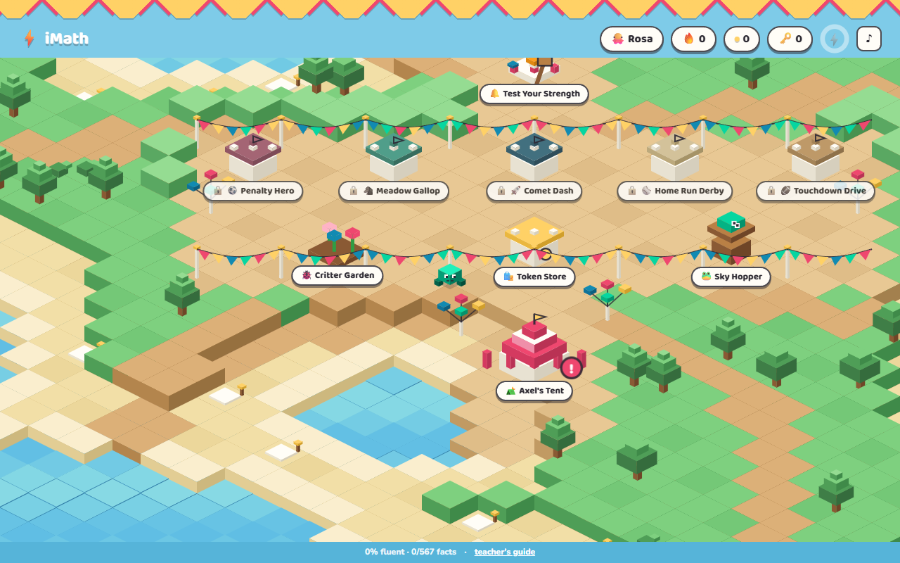
🟢 Green Light is the daily goal: answer a target number of different facts correctly in a day. The target is 40 — but it is capped at how many facts the student actually has in play, so a day-one child with ten facts can still win the day. Hitting it extends their goal-day streak.
🗝️ Keys come from Green Light days — one key per streak day — and one key opens any booth the student chooses. Booths are earned, never bought, and never gated behind a fixed order.
Sky Hopper
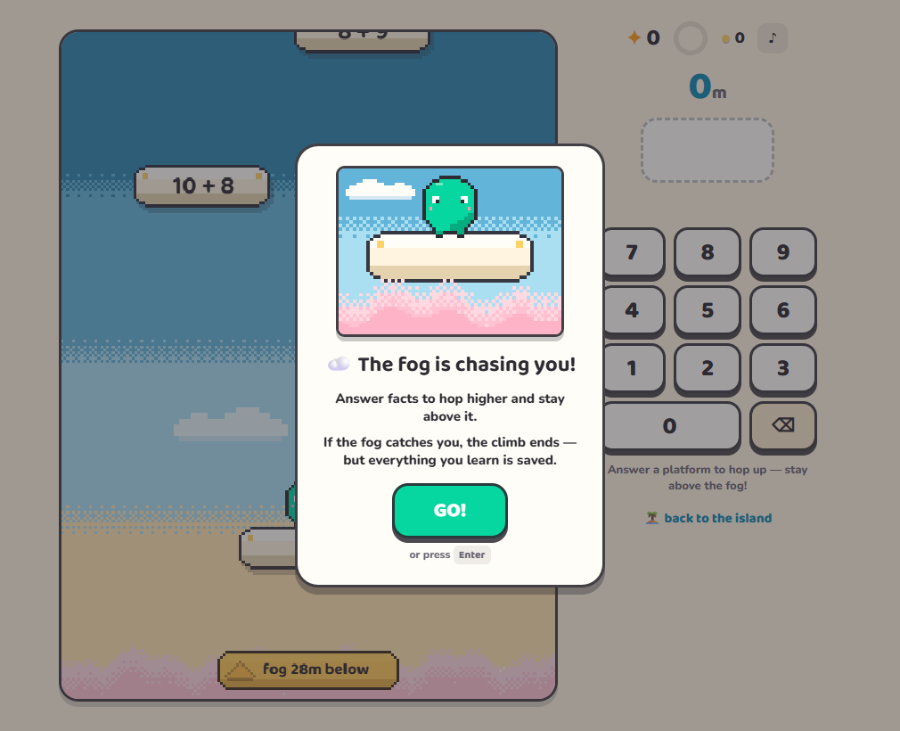
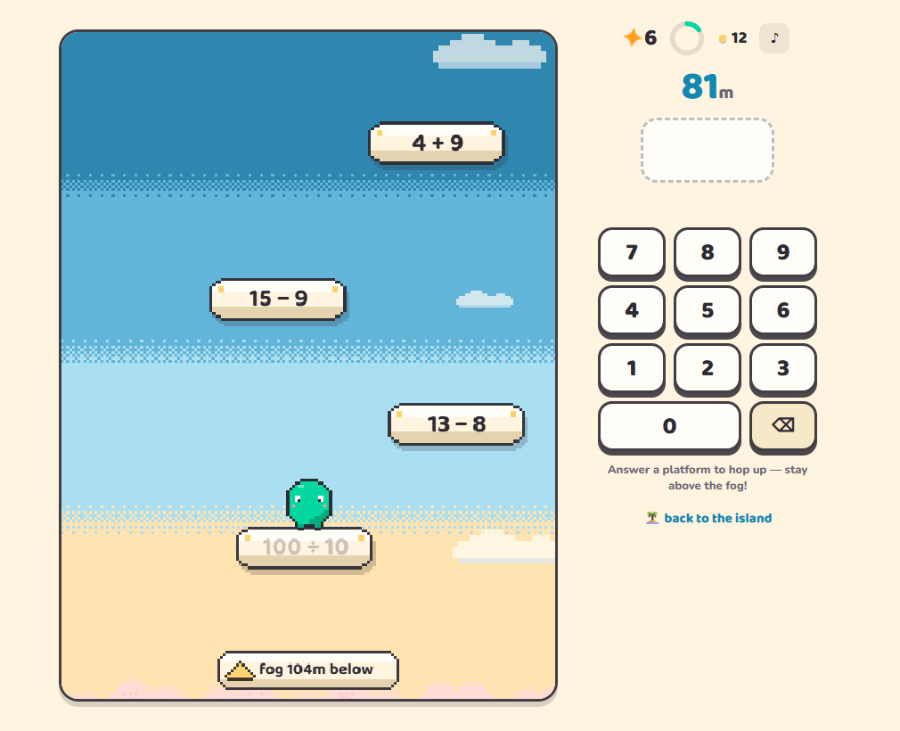
the tense oneThree platforms are live at once, each labelled with a fact. Answer one and the frog hops up to it. A wall of fog rises from below the whole time; if it catches you, the climb ends.
The loss condition is announced before the game starts, and the card closes with the promise that makes the whole thing safe: "If the fog catches you, the climb ends — but everything you learn is saved." The climb can end; the learning behind it never rolls back.
Critter Garden
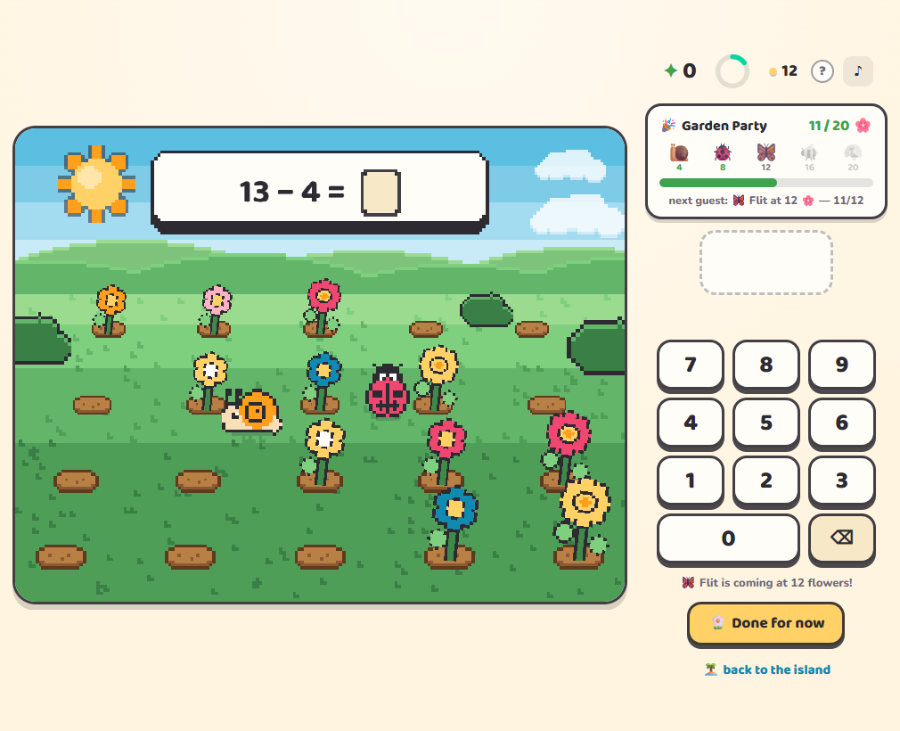
the calm oneNo timer, no chase. Every correct answer grows a flower, and flowers bring visitors: Shelly the snail at 4, Dot the ladybug at 8, Flit the butterfly at 12, Buzz at 16, and Plume at 20 — which throws the Garden Party.
The Garden Party tracker is the point: a child who finds Sky Hopper stressful gets the identical fluency engine wrapped in something that only ever accumulates. Every classroom needs both temperaments available.
Your view
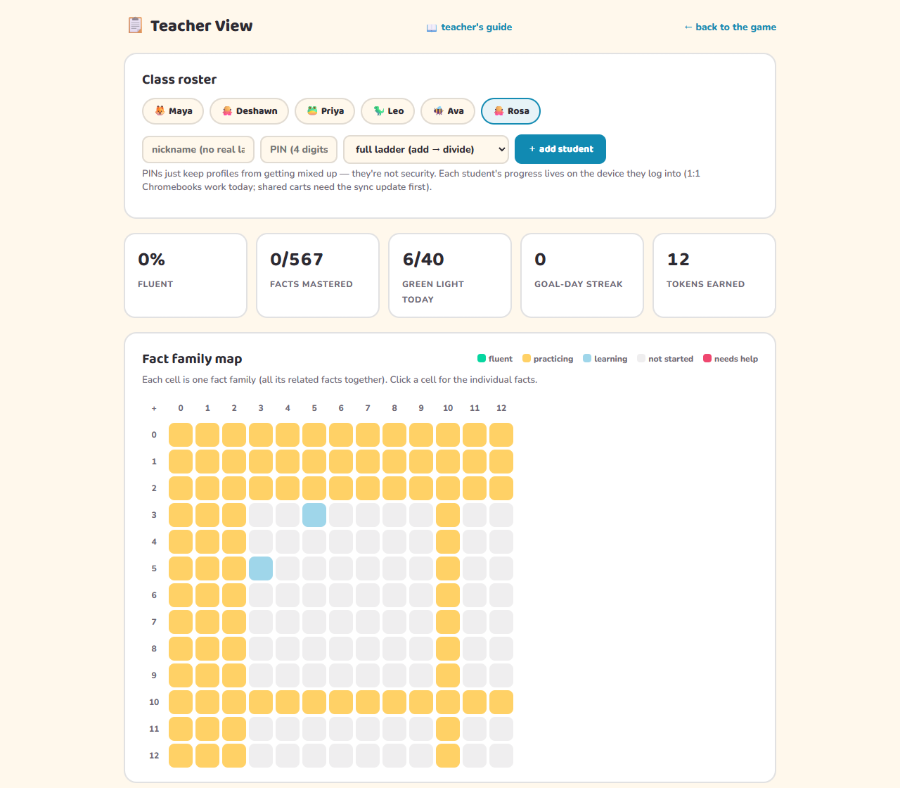
/dashboard.htmlOne tab per student, five summary numbers, and a fact family map — one cell per family, colored fluent / practicing / learning / not started / needs help. Below it, "Needs a hand" lists the families a student has missed three times running, each with the strategy hint to try one-on-one.
Per-student controls sit at the bottom: switch their fact set (full ladder, add–subtract only, multiply–divide only), unlock all games, reset progress, or remove the student entirely.
How the engine decides what to serve under the hood
- Fast enough means under 3 seconds for add/sub and 4 seconds for multiply/divide — plus that child's own typing allowance from the warm-up.
- Mastered takes three fast correct answers in a row. A miss resets the run, and a correct-but-slow answer simply doesn't count toward it.
- Mastered facts come back on a spaced-review ladder: 1 day, then 3, then 7, then 14. One miss drops a fact straight back to practicing.
- Games serve the frontier. Nine of every ten problems come from facts already in play — review-due ones first, then facts not yet answered today — and every tenth is a brand-new fact. That is incremental rehearsal: mostly known, one new thing at a time.
- Nothing repeats immediately. A fact rests 60 seconds after a correct answer and 15 seconds after a miss, so no child can be cornered by the same fact twice in a row.
- Three misses in a row flags the family for you and routes it to Axel's Gym for explicit coaching rather than more drilling.
- Power-Up families get airtime. After a student finishes the Daily Power-Up, the families they just worked on appear more often in every game — about one problem in four — so new learning gets played the same day, not shelved.
- Sky Hopper doesn't judge speed. That game rewards waiting for a safe moment, so timing there would punish good strategy. It counts right and wrong only; the other games carry the speed evidence.
The Daily Power-Up practice before play
Once a day (after 12 quiet hours), the game booths ask students to stop by Axel's Gym first. The Power-Up takes about 3–5 minutes and has three parts:
- 1 · Re-check. Two quick problems from each family the student focused on last time. Both right — kept it, celebrated. A miss — the child sees the answer, types it correctly, and that family goes back into today's focus. This is how mastery is re-verified at the next sign-in instead of assumed.
- 2 · Today's family. One or two fact families chosen for that child: first any family that failed its re-check, then families the games flagged (misses and unanswered problems are both counted, per fact, forever), then the next new family on the ladder. The child sees the strategy in words, then fills in the whole family — every related equation, untimed. Facts that are really rules (adding zero, times one, times ten) are taught once as the rule, not as eleven separate droning families.
- 3 · The set. A short mixed round — roughly three known problems for every one from today's family. That ~75%-known mix is deliberate: drill research (Burns 2004, across 55 effect sizes) found sets in the 70–85%-known range beat harder mixes, and mostly-known practice is also what keeps an eight-year-old willing to show up.
Two families never share a number on the same day (similar facts interfere with each other while both are fresh), no step shows a clock, and a brand-new student is never double-gated: finishing the strength scan counts as day one's Power-Up. The design follows the strategy-then-drill finding (teaching how to derive a fact, then practicing it fast, beats drill alone on retention) — the same structure Reflex used, rebuilt from the primary research. The full evidence brief, with sources and honest confidence labels, ships with the app's docs.
The Game Designer Program 6 phases
Alongside the daily fluency work, every student designs a game of their own on paper — and we build it. The packet is six phases; phases 3 and 4 repeat as often as you like.
⟳ Phases 3 and 4 are the iteration loop — repeat them and designers collect versions (v2, v3…).
Sheets are one focused task each, sized for large 3rd-grade handwriting, with scan-anchor marks so completed packets can be photographed and read back automatically. Nothing assumes a game has coins. Phases 2–4 work unchanged for a cardboard-arcade unit — same design loop, cardboard instead of pixels.
Phase 1 prints on its own, landscape, so a worked example sits next to every box the child fills in — plus a handwriting warm-up, because these pages get read back by software. Phases 2–6 are the portrait packet.
It really does get built
🚵 Loon Mountain is the first one. A third grader called River filled in Phase 1 and it is now a booth on the island, next to the seven we wrote ourselves. His sheet said a racing game on Loon Mountain, in orange, green and blue, that should feel excited · speedy · powerful, and: "First, the player is biking. If he gets the math question right he does a trick. If he does it wrong he falls. Also the more you get it right the harder it gets."
That is the game, line for line — right answer, trick; wrong answer, wipeout; the ramps come faster the better you do. Show it to a class before they fill in their own sheets. Nothing convinces a designer to write more detail like seeing another child's detail turned into a booth.
The term at a glance how it lands
3rd-grade standards it exercises labels & titles
scroll sideways for more →
| Standard | Title (abridged) | Where it shows up |
|---|---|---|
| 3.OA.C.7 | Fluently multiply and divide within 100; know products from memory | The daily games themselves — the core fluency engine (add/sub facts likewise for students assigned them) |
| 3.OA.A.1 · A.3 | Interpret products; solve problems with equal groups and arrays | Phase 6 Math Brainstorm: planning collectibles as an array or as equal groups |
| 3.OA.D.9 | Identify and explain arithmetic patterns | Phase 6 Math Brainstorm: writing a pattern rule for their own game ("every 4th coin…") |
| 3.G.A.1 | Categories of shapes; recognize and draw quadrilaterals | Phase 6 Math Brainstorm: quadrilateral hunt in their own game art |
| RI.3.3 · RI.3.8 | Describe a sequence of steps; connect sentences with first/second/third | Phase 2: the loop is a sequence — the detective sheet and their own goal → action → tricky part |
| W.3.1 | Opinion pieces: point of view, reasons, linking words, conclusion | Phase 5 pitch ("You should play my game because… also… finally…") |
| W.3.2 | Informative/explanatory writing with illustrations | Phase 1 paragraph, with the hero drawing as the illustration |
| L.3.1 · L.3.2 · L.3.3a | Grammar, capitalization/punctuation/spelling, word choice for effect | Every written field; title capitalization; the feelings word bank |
| SL.3.1 · SL.3.4 | Collaborative discussion; report with facts and details, clear pace | Phase 4 playtest conversation; the Phase 5 one-minute pitch |
| CA NGSS 3-5-ETS1-1 | Define a design problem with criteria and constraints | Phase 2: naming the goal, the action, and what makes the game tricky |
| CA NGSS 3-5-ETS1-3 | Carry out fair tests and use results to improve a design | Phases 3 & 4 update cards — observe, change one variable, predict, retest |
Accessibility plainly, both halves
Two things are true at once here, and it is worth knowing which is which. The math is built to be reachable without a mouse, without sound, and without color vision. The arcade around it is deliberately a real arcade — with win goals, rising challenge, and endings you can hit. That second part is engagement design, on purpose, and it never touches a student's math record. Full detail, including what we know is still weak, is in the accessibility statement.
What the app does for access
- Playable start to finish on a keyboard. Arrow keys or WASD walk the island, Enter or Space opens the booth you are standing at, and every answer in the app — warm-up, strength test, all eight games — can be typed on the physical number keys. The on-screen keypad is a convenience, never the only route.
- Captions on every spoken line. When Coach Axel or any character talks, the words appear on screen as a caption — and they appear even when sound is muted. A deaf or hard-of-hearing student, headphone-less Chromebook, or a whole class on silent misses nothing that is said aloud.
- Reduce-motion is honored. If a device asks for reduced motion, the particle effects and the big celebratory animations switch off automatically — in every game and in the island's own animations.
- Nothing strobes. The fastest pulse anywhere in the app is about one cycle a second (a low-fuel warning gently breathing) — nothing comes near the three-per-second seizure-safety threshold, and no screen ever flashes white.
- Color is never the only signal for a student. Locked booths carry a padlock, not just a dimmed sign; answer feedback comes back as words as well as color; and fluent facts are marked with a ★, not a shade. In your view, the fact-family map is colored, but clicking any family spells out every fact in it in words — status, correct count and streak — so nothing there is reachable only by hue either.
- Typing speed is calibrated out. The finger warm-up measures each child's own milliseconds-per-digit and adds it back into every "was that fast?" judgement. A slow typist — or a student with a motor difficulty — is never scored as a slow mathematician.
- Critter Garden is the gentle path. No chase, no clock, nothing to lose: the Garden only ever accumulates until after the child has already won the Garden Party, and even then the sunset is written as a lullaby, not a failure. It runs the exact same fluency engine as the tense games, so choosing it costs a student nothing.
- An ending never costs progress. Whatever ends a run — the fog, a third strike, a turnover, hull damage — every fact answered along the way is already banked. The end panels say so out loud: "Every fact you practised is already saved."
What the arcade layer deliberately is
An earlier version of this page promised "no lives, no strikes." That is no longer true, and the change was a decision, not an oversight — kids stopped caring about games they could not lose. Here is exactly what was added and what it does not do:
- Real win goals and real endings. Home Run Derby has strikes and a "you're out"; Touchdown Drive has downs and a turnover; Comet Dash has hull damage; Sky Hopper has the rising fog; Meadow Gallop has a rival who can pull ahead. Each game also has something to win, and the challenge climbs as a student plays well.
- Game mechanics never take math credit away. Striking out costs a student nothing on the fluency ladder. Facts are earned by answering them; a bad inning cannot un-earn one, and no game outcome affects the Green Light goal, keys, or anything in your teacher view.
- The pressure is real but unlabeled. The games run on a hidden clock — the art rules ban visible countdowns — so a student who reads or types slowly can feel the difficulty without seeing the reason. That is a genuine trade-off, and it is the main reason the untimed alternatives exist: Critter Garden for practice and Axel's Gym for one-on-one coaching, both always open, both fully credited.
- Nothing is public. There are still no leaderboards, no scores shown to classmates, and no timers displayed to the child. The competition is with the game, never with the room.
Privacy & COPPA how we comply
- Two ways to run it, and you choose. Without an account, everything stays in the browser on each Chromebook — nothing is transmitted at all. With a class join link, a player's nickname and math progress are saved to our server so they can sign in on any device. Nothing else changes: the same made-up names, the same complete list of what's stored, in Terms & privacy.
- Made-up names only — the game rolls them. New players get a dice-rolled nickname like ZippyWaffle from a hand-screened word list; there is no way to type a real name (or any words) anywhere in the game. You keep your own paper list of who is which nickname. Never needed: real names, emails, birthdays, photos, or voice recordings. Your email is the only address we hold, and it is yours, not a student's.
- PINs are stored scrambled, and nobody can read them. Not us, not you — the teacher view offers reset, never reveal. Five wrong tries locks that player for fifteen minutes.
- No grades. The teacher view shows fluency progress (which facts are automatic), not scores or grades.
- Character voices are pre-recorded. All audio was generated in advance from our scripts — no student speech or text ever reaches any AI or voice service.
- Paper stays paper until you approve. Worksheet scanning happens through the teacher; nothing a student writes goes online, and packets use nicknames like everything else.
- Erasable on demand. One button in the teacher view removes a student's data from the device; email us and a whole class — nicknames, progress, PINs — is deleted from the server permanently, normally within a few days.
Sharing this with your principal or district? There's a printable one-page summary of exactly what is stored and why the usual permission process isn't triggered: A Note for Your Principal.